
Why a Google Sheets version?
Most of our clients run their cutover in a spreadsheet. If your programme works in Google Workspace, this is the same approach as our MS Excel Cutover Detailed Plan template, rebuilt for Google Sheets:
- One live plan, edited by everyone. Every cutover actor updates their own tasks in the same file. No more versions sent by email.
- Views for each reader. The plan is a Google Sheets table, so you can read it by Phase and Section, or by Section only, without changing what others see.
- Owners from your contacts. Owner is a People smart chip, linked to your Google contacts.
- A dashboard that updates itself. Delayed and overdue tasks are calculated from today’s date.
New to cutover? Start with Understanding Cutover: A Comprehensive Guide for Project Managers. For why the detailed plan is the cutover manager’s single source of truth, see The Cutover Detailed Plan.
What’s inside the template
- Instructions: how to use the template: views, dates, owners and drop-down lists.
- Cutover Dashboard: progress at a glance, dated today.
- Cutover Detailed Plan: the plan itself: every task, owner, time and status.
- Contacts: every cutover actor, with title, team and email.
- Parameters: the lists behind the drop-downs: phases, sections, statuses, environments.
Three hidden tabs do the dashboard’s calculations. Leave them as they are.
The template is generic: it works whatever the industry and the technology you are cutting over. The example tasks use dates calculated from today, so the dashboard shows live data when you open it. Replace them with your own; the format is not frozen, so adapt it to your programme.
The Cutover Detailed Plan tab

The Master Plan! Your single best friend during the cutover phase.
Columns you fill in
- Cutover Phase | Drop-down: 1 – PreCutover, 2 – Cutover or 3 – Post Go Live.
- Section Name | Drop-down: groups tasks by workstream (Application, Configuration, Integration, Payroll, Marketing, Communication…) for views and reporting.
- Env | Drop-down: PreProd, Prod or QA. Keep one plan per environment (PreProd for the dress rehearsal, Prod for go-live), or both in one plan when Prod depends on PreProd.
- Planned Start Date | dd-mm-yy hh:mm: when the task starts.
- Duration (min) | Number: how long the task should take.
- Planned End Date | dd-mm-yy hh:mm: calculated from the duration for short tasks; type the end date yourself when a task runs over more than a day.
- Task Description | Free text: what has to be done, in enough detail that someone else could do it.
- Owner | People smart chip: the person who does the task.
- Status | Drop-down: 1 – Not started, 2 – In progress, 3 – Blocked, 4 – Completed, 5 – Cancelled.
- Is Milestone | Tick box: marks the go-live milestones your sponsor follows.
- Notes | Free text: anything from a cutover session or from the night itself, so nothing is lost.
Columns the sheet calculates
- Team Owner: the owner’s team, read from the Contacts tab.
- Is Delayed: the task is not started and its planned start has passed.
- Is Overdue: the task’s planned end has passed and it is not completed or cancelled.
- Is On Track: the task is in progress and its planned end has not passed.
Three tips to get more from it
Tip 1: your communication plan is already in the plan
Keep a Section called Communication for every message sent during the cutover. Filter Section Name on “Communication” and you have your cutover communication plan, with times and owners. The key principle remains the same: keep ALL information in one single place.
Tip 2: read the plan the way you need it
Use the table’s views: by Phase and Section (recommended) or by Section. You can create your own view, or remove the view and sort by Phase, Date and Section to see the exact sequence of events. Filter on Is Milestone for a sponsor’s view of the key steps.
Tip 3: lock the lists before you share the plan
Set up the Parameters tab before you invite the teams. The plan is shared and updated by many people: fewer free-typed values means cleaner views and a dashboard you can trust.
Already building a plan for a live programme and unsure it will hold at go-live? Our free cutover health check is a review of your cutover approach, plan and risks by senior cutover managers, before you commit to anything.
The Contacts tab
Every cutover actor in one place: name, title, team and email. Add the team by hand; once the name is a People chip, title and email come from the person’s Google contact details. The plan’s Team Owner column reads the team from here.
The Parameters tab
The lists behind every drop-down: Cutover Phases, Sections, Statuses and Environments. Add your own sections (for example “Data Migration” or “Hypercare”) here, not in the plan.
The Cutover Dashboard
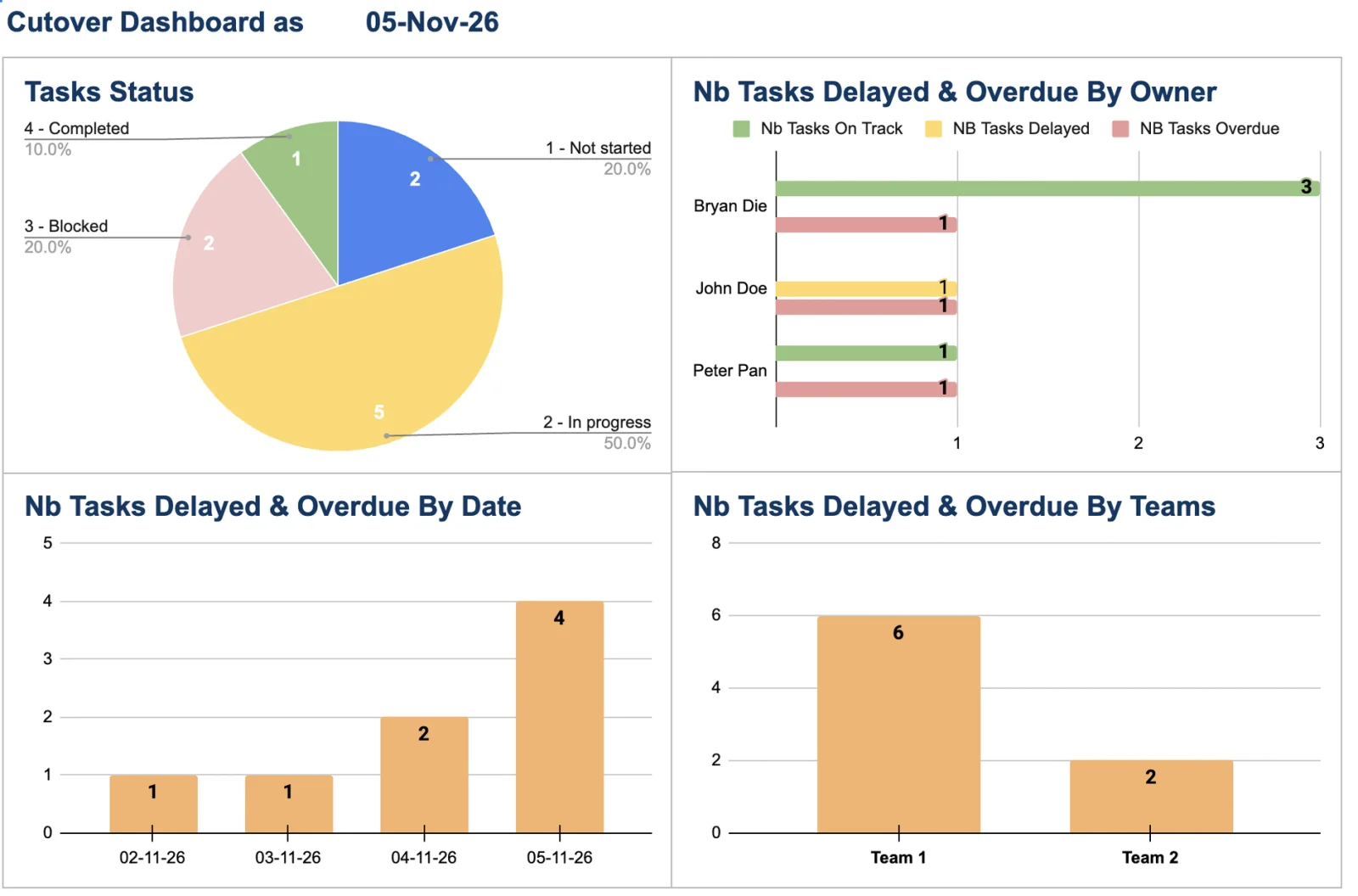
A simple visual report on the cutover’s progress, dated with TODAY(). Copy it straight into a status email to senior stakeholders. Four charts, all updated from the plan:
- Tasks Status: how many tasks are not started, in progress, blocked or completed.
- Delayed & Overdue by Owner: for each owner, tasks on track, delayed and overdue. Your follow-up list for the next cutover call.
- Delayed & Overdue by Date: the days where late tasks pile up, so you can see where the timeline is at risk.
- Delayed & Overdue by Team: which team needs attention first.
How to start in five steps
- Get the link below, open the template, then use File › Make a copy to save your own version in your Google Drive.
- Fill in the Parameters tab: your phases, workstreams and environments.
- Add your cutover actors to Contacts.
- Delete the example tasks and build the plan section by section with each team.
- Share it with the teams, review it in your cutover sessions, sign it off, then run go-live from it.
Prefer Excel? The MS Excel version adds a high-level view, a milestones view and an action log.
Frequently asked questions
Is the template free?
Yes. Leave your details below and we email you the link.
Excel or Google Sheets: which should I use?
The one your programme already works in. Google Sheets is better when many teams update the plan at the same time; the Excel version has more views (high-level, milestones, action log).
Can I use it for a dress rehearsal?
Yes. Set Env to PreProd for the rehearsal tasks, or keep one copy per environment.
Does a template replace a cutover manager?
No. It gives you the structure; the work is getting every team to put the right detail in it, and running the night. Book a call if you want help with yours.
Get the Google Sheets Cutover Plan Template
Free, Google Sheets version
Backed by Experience, Loved by Clients.











Testimonials
Turned Chaos into Control
When we started our project, we were in complete chaos - tight timelines, complex legal requirements, and extremely high risk since we couldn't roll back once we began. I knew we were in safe hands from the very first interview with Antoine.
What stood out immediately was the attention to detail and ability to bridge the gap between our technical teams and business stakeholders. When we discovered our system outage would impact globally instead of just Spain, tensions were sky-high. Antoine quickly provided alternatives, calmed everyone down, and gave us confidence we could still deliver.
The devil is always in the details with cutover, and that's exactly what Cutover Manager Services delivered - turning chaotic conversations into meaningful, actionable plans.
Thanks for making the impossible possible!
⭐⭐⭐⭐⭐
SAP S/4HANA Finance, HR, and Legal implementation - Go Live in October 2024
Seamless transition when we needed expertise fast!
When we were transitioning between PAS and EPR platforms, Cutover Manager Services joined us at the later stages and had to hit the ground running. From the moment we engaged their services, their expertise and dedication shone through in every aspect.
What impressed me most was their unparalleled professionalism - attentive, responsive, and truly committed to ensuring a smooth transition. Their strong communication skills and ability to understand our unique requirements enabled them to create a tailored plan that perfectly aligned with our objectives.
Their deep understanding of cutover management best practices and ability to anticipate potential risks was truly impressive. The attention to detail was remarkable, ensuring no aspect was overlooked while meticulously coordinating with our team and stakeholders.
Their adaptability and unwavering commitment to customer satisfaction make them an invaluable partner in navigating complex cutover processes.
⭐⭐⭐⭐⭐
EPR IMS Maxims - 20 Hospitals - Go Live in November 2021
Delivered Against All Odds
Antoine has been instrumental to the successful Cutover of Future Core 1.0 and 1.1. His thorough planning and hours spent refining the cutover plan, following by executing and continuing to refine his plan whilst leading on issue fixes has let to ussuccessfully going live. He has taken activities over and above is role so as to ensure we met the previous critical path.
Thank you Antoine, we couldn't have done this without you!
⭐⭐⭐⭐⭐
SAP S/4HANA Finance Cutover - Go Live January 2024
Exceeded Expectations
I have to admit that when I went on Google typing "Cutover Manager" and finding you on cutovermanager.com I had some doubts. It was too good to be true! 🙂
But at the end of the day, it appears to be a great pick!
Wish you all the best for your next assignment,
Thanks again.
⭐⭐⭐⭐⭐
WORKDAY Cutover for Air Liquide - Go Live in March 2023
Executed With Precision
CMS delivered the cutover on several key projects at BSPS, as we moved East Surrey Pathology services into the BSPS network. The Cutover Manager built a very detailed cutover plan and executed this with precision and calmness, liaising with many technology, clinical and pathology teams within the network and the trust.
⭐⭐⭐⭐⭐
LIMS Integration with EPIC and Cerner Cutovers + Lab Automation & Integration with EPIC Cutover for BSPS - Several Go Lives in 2022
The Zero Issues Cutover
CMS ran the cut over plan for a major systems upgrade for us, the tenacity and attention to detail from the Cutover Manager enabled us to plan and deploy with zero issues! Excellent cut over manager and highly recommended!
⭐⭐⭐⭐⭐
SAP Upgrade - Go Live in August 2020
Get Started
Get Your Cutover Assessment Today?
Embarking on a cutover is a transformative journey.
Our mission is to make this journey as smooth and enjoyable as possible. With our expert guidance and tailored approach, a successful go-live is within reach for anyone.
Schedule a call today or drop a message on our contact form to start your journey to seamless transitions!